Timelines and post visibility options
If you aren't familiar with Mastodon/Hometown, or if other servers you've joined work differently, the various feeds and visibility options at flipping.rocks may be confusing. Here's a quick explanation.
Timelines
Basically:
- Home: all posts from the people you follow, plus posts they boost.
- Local: all public posts from everyone else on flipping.rocks.
- Federated: all public posts from people followed by anyone on flipping.rocks, plus posts they boost.
Here is a more detailed explanation:
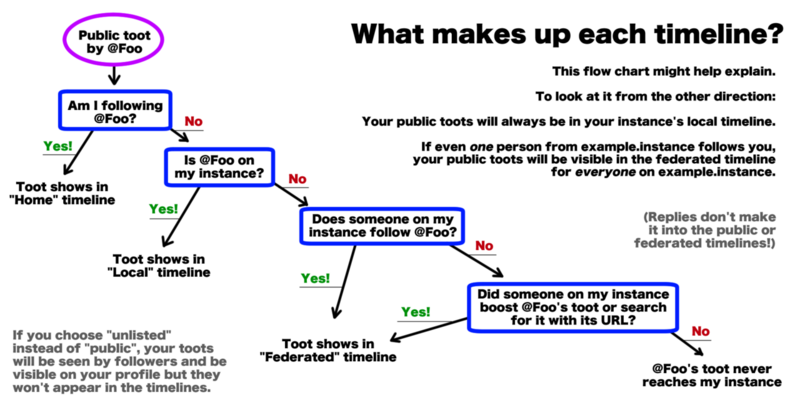
Original source: Wikimedia

Post visibility options
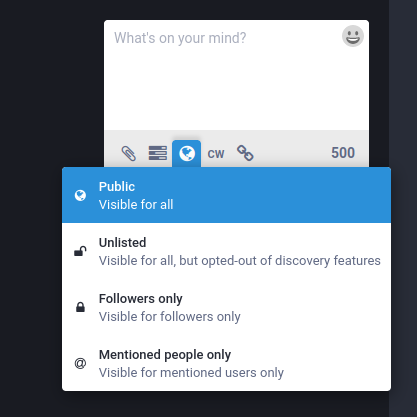
If you post something unlisted, your followers will see it, but it won't show up in Local or Federated timelines, or in searches for any hashtags in it. This is good for long threads, for example.
Direct messages, where only people mentioned can see them, are not end-to-end encrypted, and theoretically I could see them if I really wanted to. (In reality, I don't actually know how, also I am far too lazy and I just don't care.) If you need a secure communication channel, use something like Signal.
Local-only posting
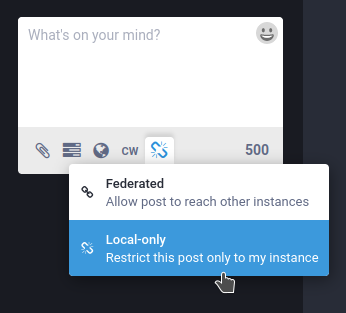
The flavour of Mastodon this server runs on, Hometown, has an extra feature: local-only posting. This means that the post will only be visible on flipping.rocks; it doesn't get sent to other servers. It will not be sent to followers on other servers, and it won't show up in other servers' federated timelines. If the post is public or unlisted, it will still show up on your profile page if someone visits it in a web browser.
You can make a post local-only by clicking the chain-link icon below the
post field. If you are using an app that doesn't have that option, you
can use the custom emoji :local_only:, which looks like this: 